By the time a fall soil test comes back, the questions about a field are specific. When did the cereal rye go in, and at what rate? Were the cores pulled before or after the fall fertilizer? Which strips in the trial were the checks? The answers exist somewhere: in a pocket notebook, a text thread, a seed invoice, a spreadsheet on someone's laptop. They are rarely in one place, and rarely attached to the ground they describe.
FieldLog keeps them together. It holds a farm's tasks, field work, inputs, soil samples, observations, yields, and trial layouts with the field each one belongs to, so a season can be read back as one account. FieldLog is one of the platforms the Soil Health Exchange team is building. When the conversation turns to soil, with an adviser, a certifier, or your own crew, it can start from the record instead of from memory.
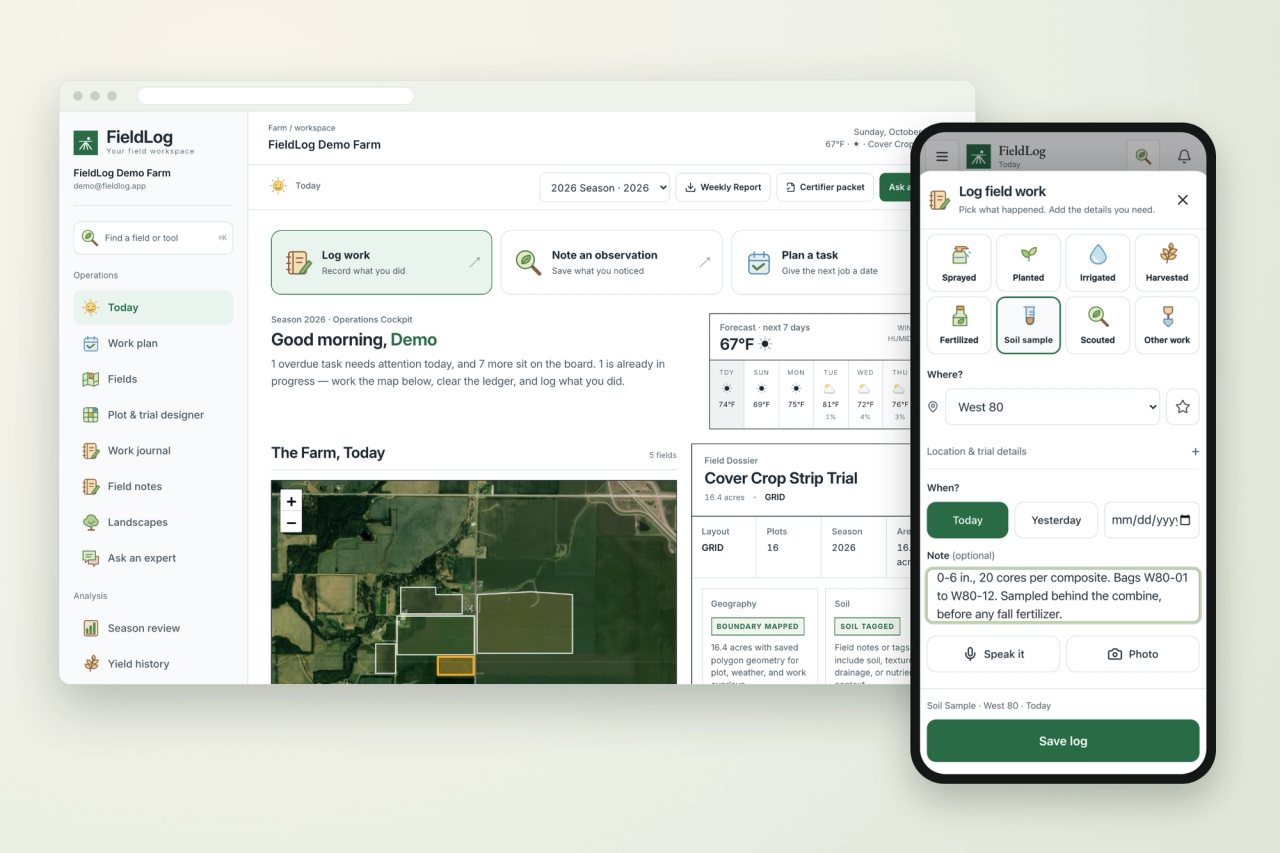
The screens below follow a sample 2026 season on five fields: corn and soybeans, cereal rye seeded behind the combine, a four-treatment cover crop strip trial, and a small field in organic transition.
Start with the plan you already have
Most operations begin the season with a plan in a spreadsheet: jobs by month, field, crop, and product. FieldLog imports that CSV or Excel file, matches its columns to tasks, dates, fields, crops, and rates, and lets you correct any column it reads differently. Each row becomes a task that moves through not started, in progress, done, overdue, or skipped.
The Today view opens on what needs attention. On October 4, that means a tile outlet on Creek Field two days overdue, corn harvest under way on West 80, and cereal rye to drill once the combine is out. A seven-day forecast for the fields sits beside the list.
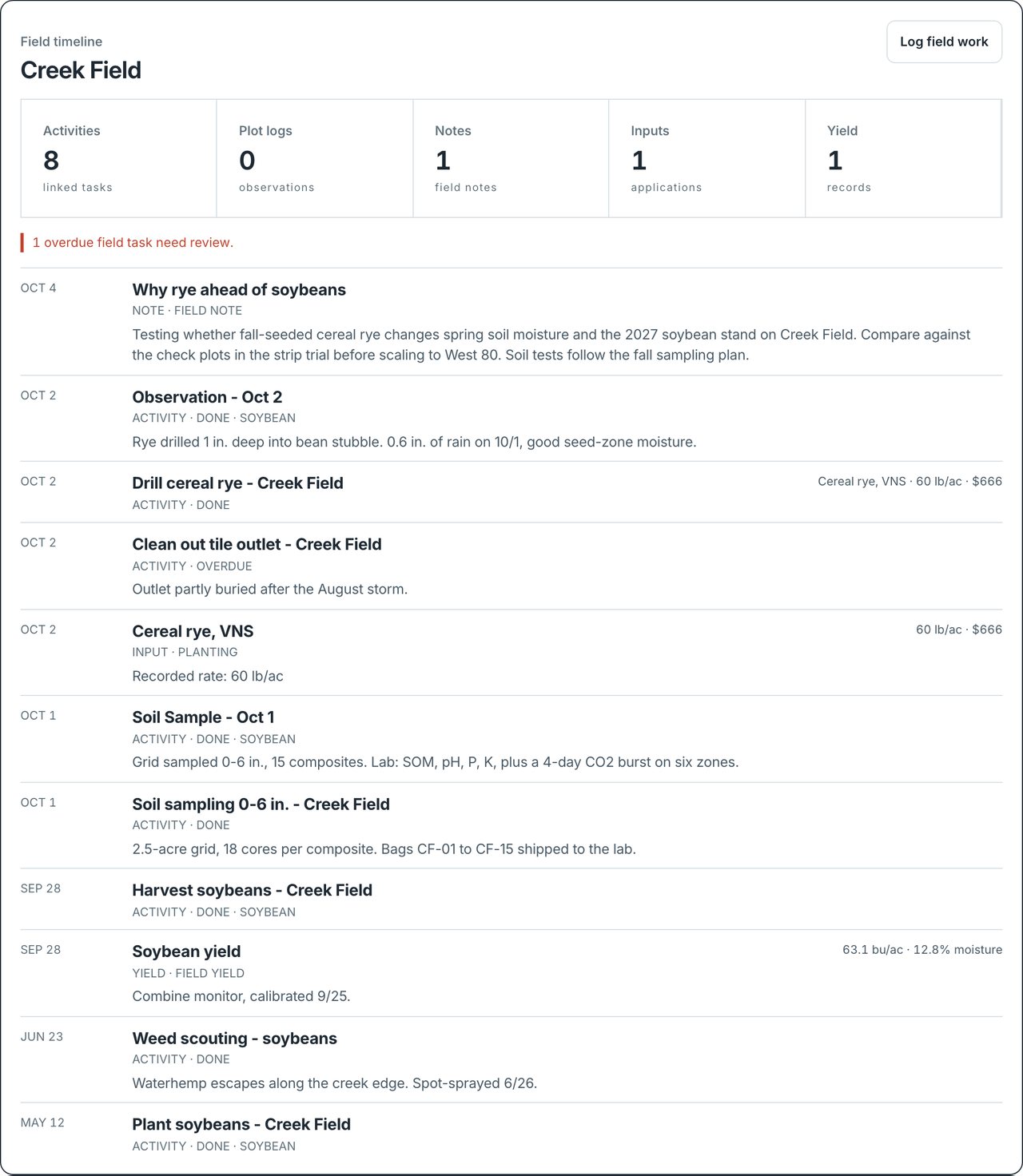
A field can start as a name and a crop. Drawing its boundary on satellite imagery, or importing one as GeoJSON or KML, adds acreage, a map, and local weather. Plot outlines follow the boundary, so a crew can find a plot and its records while standing in it.
Record work where it happens
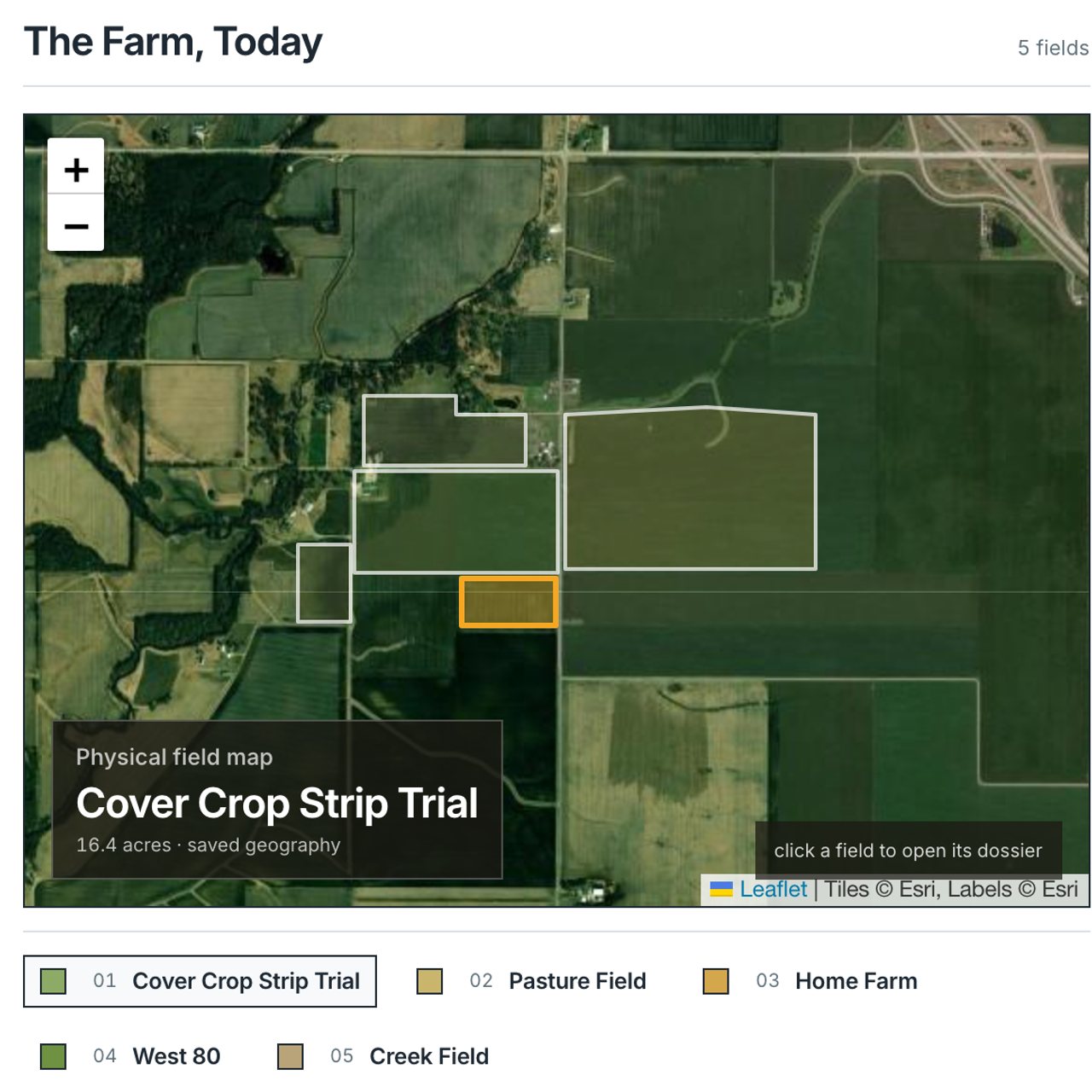
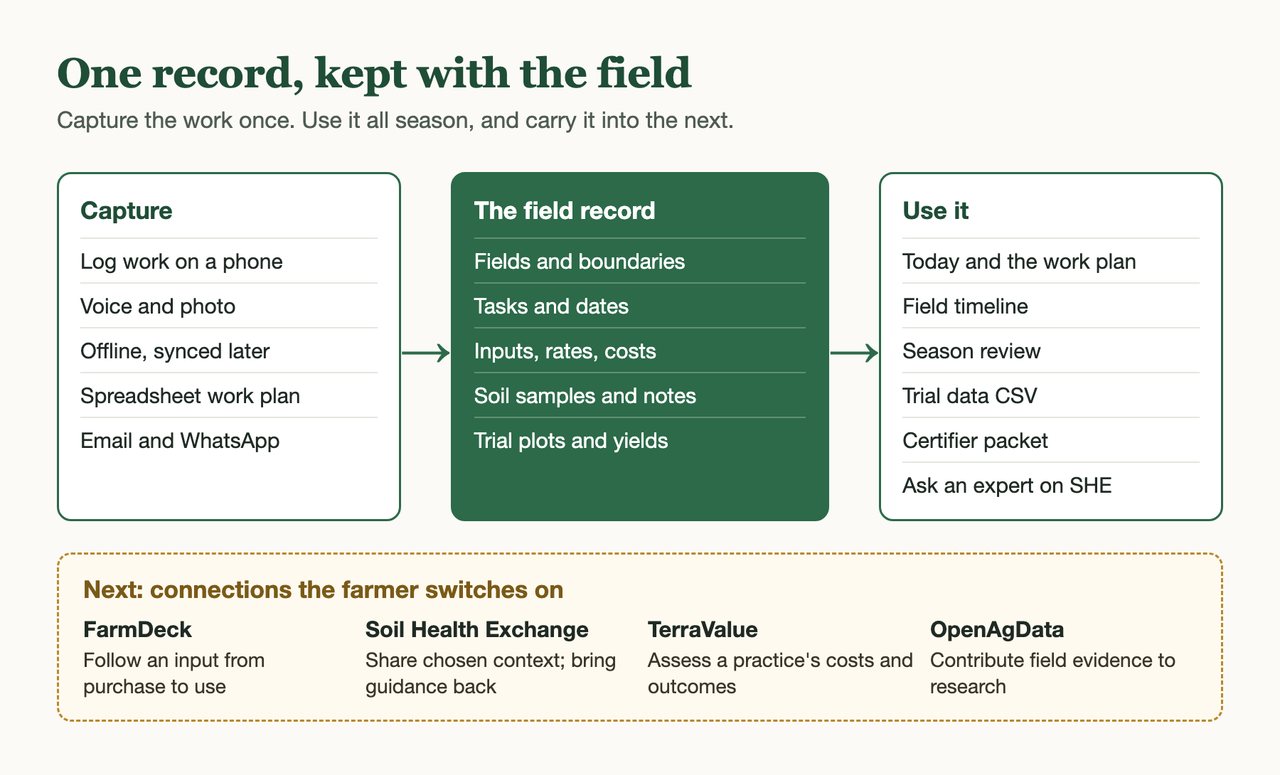
In the field, a record has to fit on a phone and survive a weak signal. FieldLog's Log work sheet starts with one question: what happened? Sprayed, planted, irrigated, harvested, fertilized, soil sample, scouted, or other work. Choose the field and the day, then add a note or a photo. Speak it turns up to 20 seconds of speech into the note and fills in the activity and field it recognizes. You check the log before it saves. A log saved without signal waits on the phone and goes through, with its original date, when the connection returns.
Products, rates, and costs entered with the work become input records, so the cost of a pass reaches the field's totals without a second entry.
Other channels feed the same record. Each season has its own email address, so a forwarded note or photo lands in the work journal. WhatsApp messages routed through OpenClaw arrive the same way. Both wait for review, and on the Pro plan, messages that clearly match a field and task can post directly. A reply to a task notification becomes a comment on that task.
Read a field's season in one place
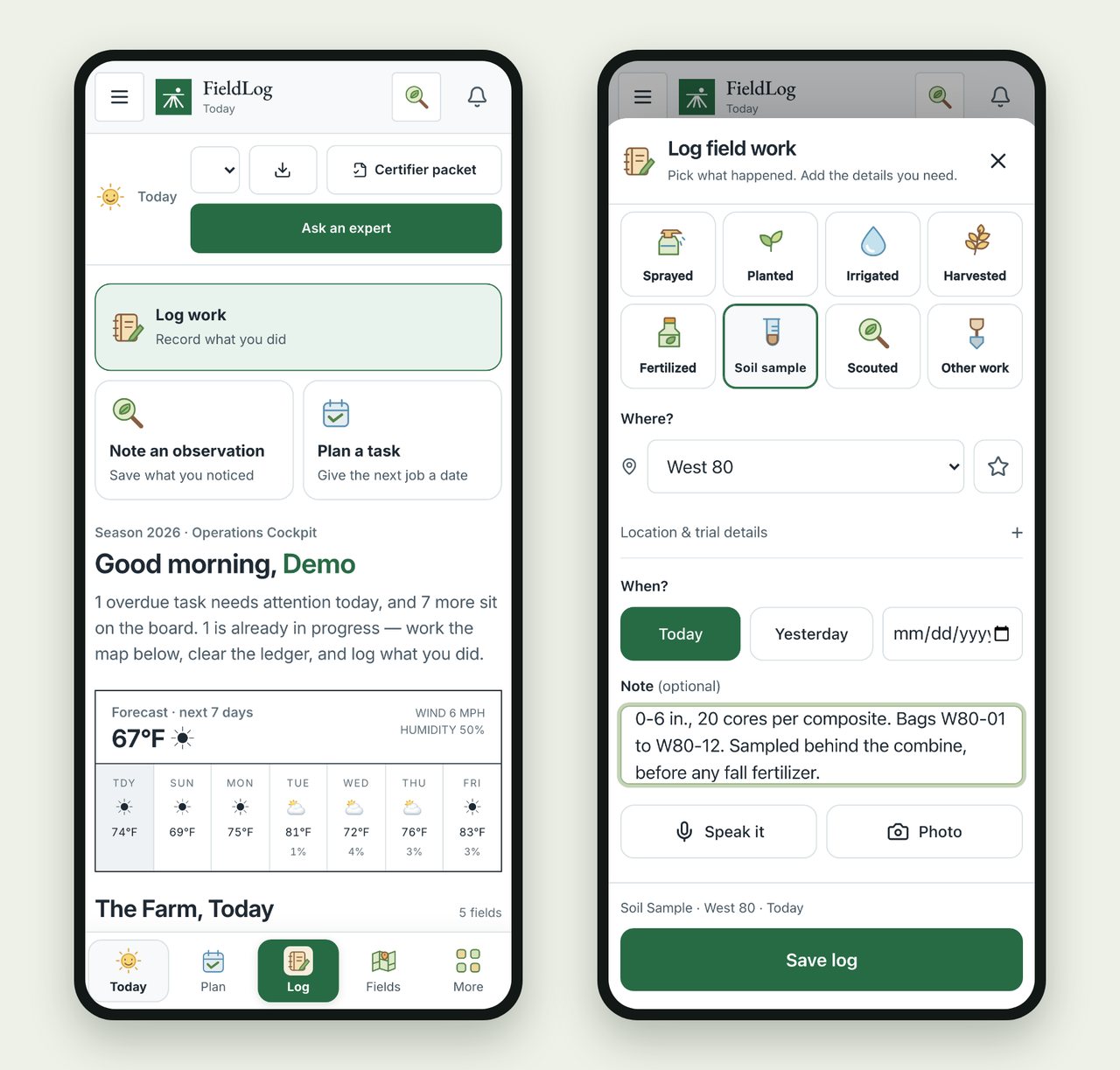
Every task, log, input, note, and yield attached to a field appears on its timeline. Creek Field's reads like a season summary. Soybeans were planted May 12. Waterhemp escapes along the creek edge were spot-sprayed June 26. Harvest on September 28 averaged 63.1 bushels per acre. On October 1, the field was grid-sampled at 2.5 acres per composite, 0–6 inches deep, with a four-day CO₂ burst run on six zones. Cereal rye went in the next day at 60 pounds per acre for $666, and a note records why.
That context shapes how results are read. Soil tests compare well from year to year when depth, timing, and lab stay consistent, as our fall soil sampling guide explains. A CO₂ burst result means more when you know what was growing and what had just been applied. The timeline keeps those facts beside the number.
Run on-farm trials with replication built in
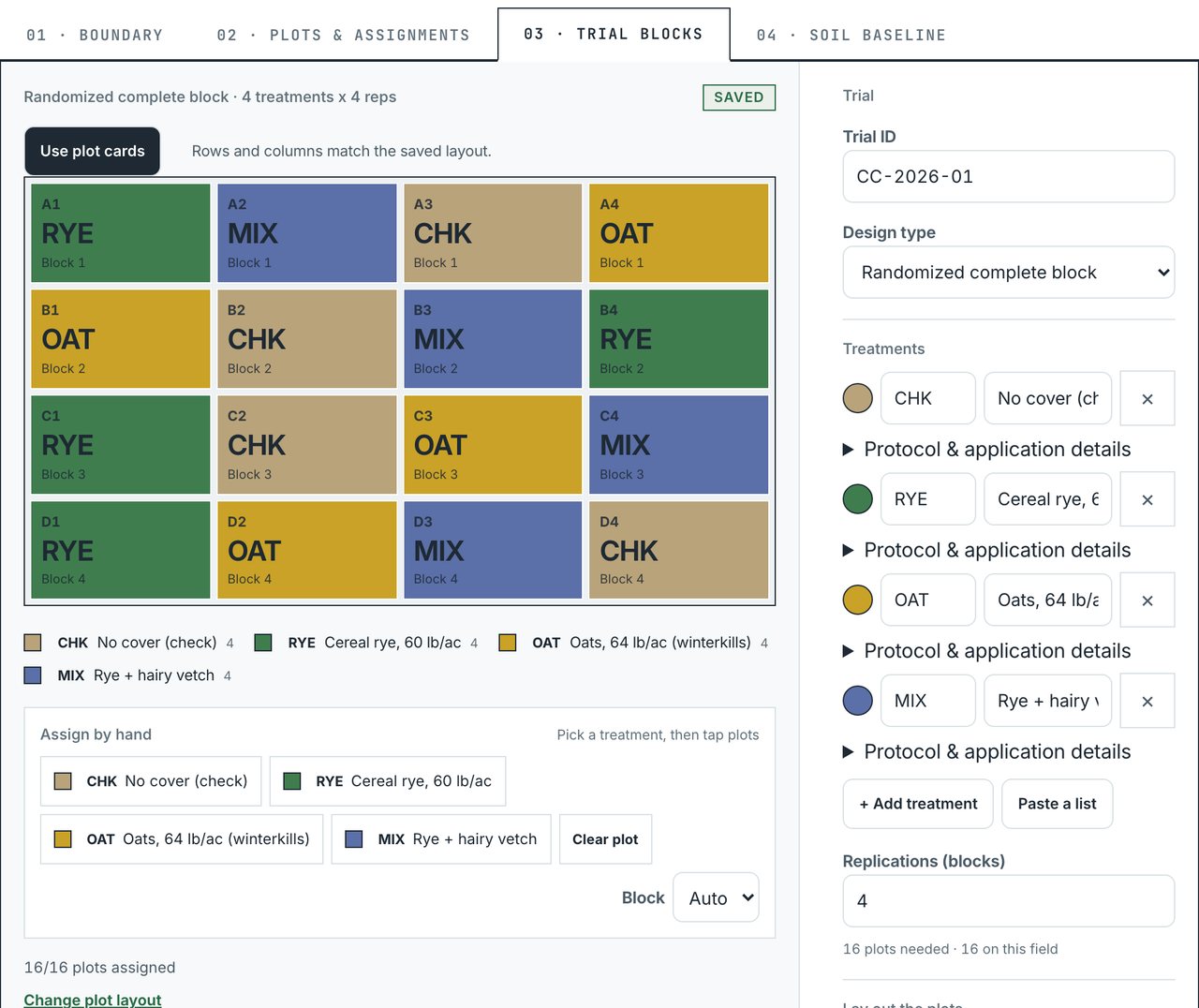
A side-by-side comparison becomes evidence when treatments are replicated and randomized. The Plot & trial designer lays out a randomized complete block or split-plot design on a field's plot grid. It also accepts a design pasted from a spreadsheet or R output, or assigned plot by plot.
The trial shown here, CC-2026-01, compares four treatments in four blocks: a no-cover check, cereal rye at 60 pounds per acre, oats at 64 pounds per acre that winterkill, and rye with hairy vetch. Treatments are shuffled within each block, and the randomization seed is saved with the design. Observations are logged to individual plots. Export plot data writes a CSV with each plot's trial ID, treatment, replication, and harvest records, ready for R or JMP.
Keep organic transition records in order
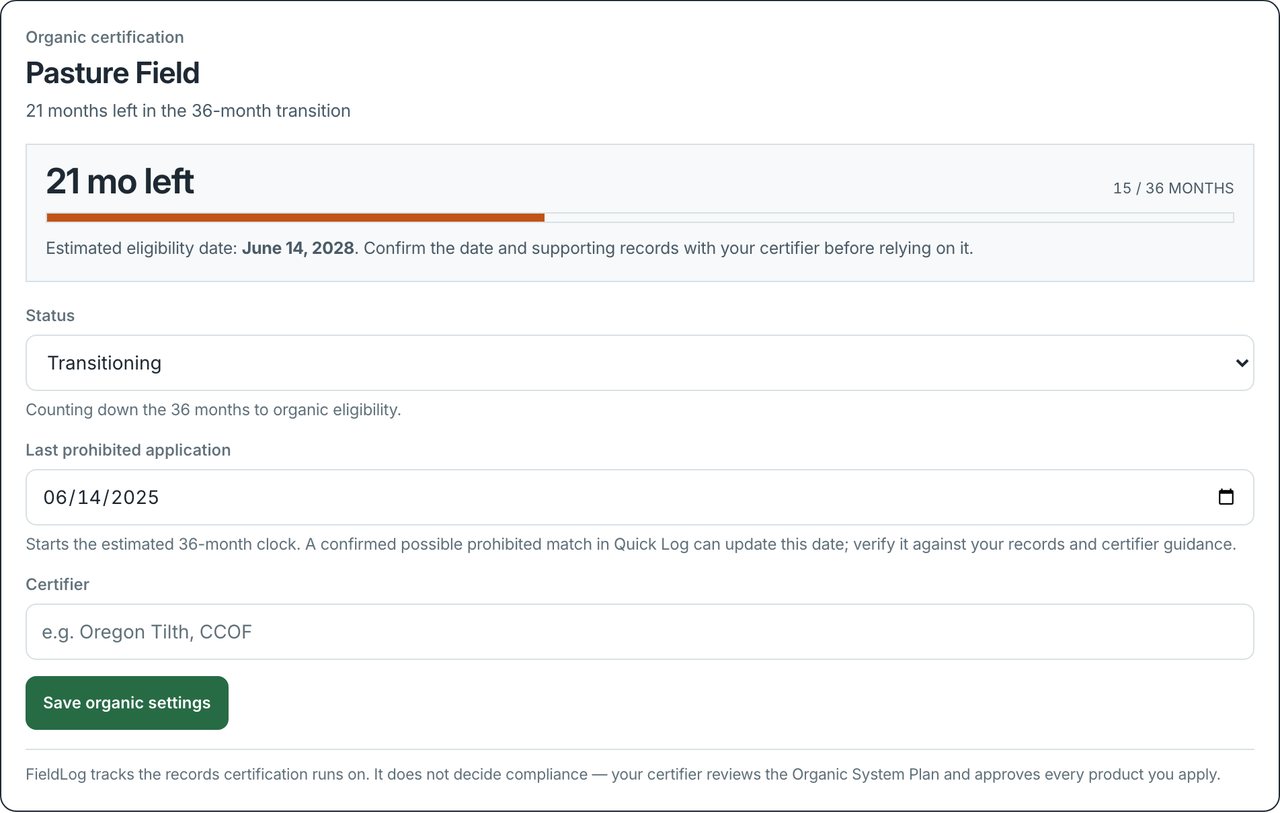
Land must go three years without prohibited substances before an organic crop is harvested from it (7 CFR 205.202). FieldLog counts that period from the field's last prohibited application. Pasture Field's was June 14, 2025, so its panel shows 15 of 36 months complete and an estimated eligibility date of June 14, 2028.
Products entered in Log work are checked by name against the USDA National List, and a possible prohibited match is flagged before the log saves. Confirming one on a transitioning field resets the clock. The certifier packet exports every input application for a chosen period, with its date, field, product, rate, supplier, and National List reading, oldest first, the way an application log is reviewed. Your certifier reviews the Organic System Plan and approves inputs; FieldLog keeps the records that review depends on. Our organic certification guide walks through the full process.
Close the season, then plan the next one
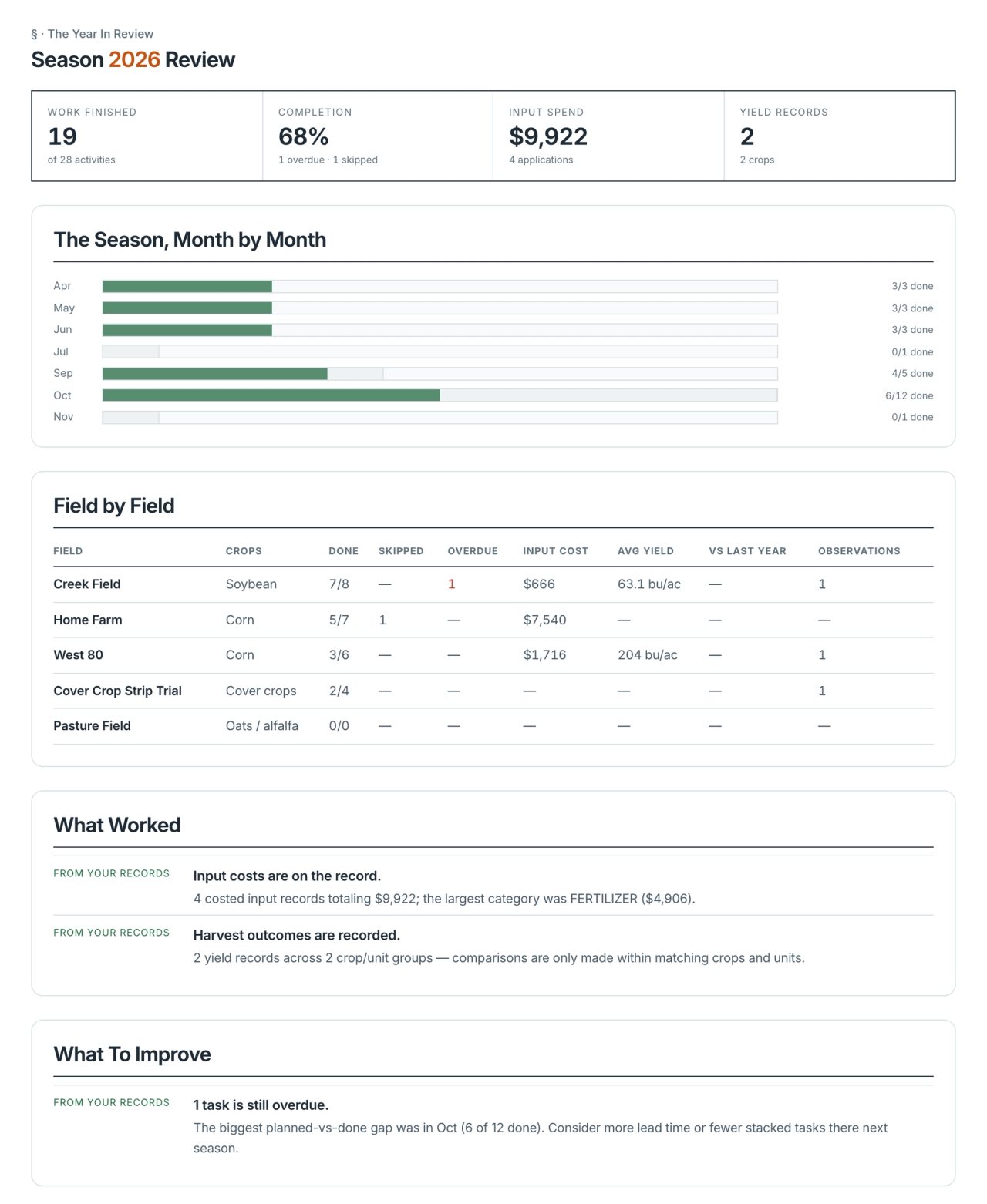
Season review turns the record into a year-end account. By early October, 19 of 28 planned activities are done, one is overdue, and one fungicide pass was skipped after scouting found leaf disease below threshold. Four costed input applications total $9,922. Creek Field's soybeans made 63.1 bushels per acre, and the first 30 acres of West 80 corn made 204 bushels per acre at 15.5% moisture. When the same ground has an earlier season in FieldLog, the review compares yields year over year.
The review also names gaps to close before spring. Here, three fields have no soil sample on record this season. Your own notes on what worked and what to change are saved with the season. Plan 2027 from this season carries the fields, boundaries, and unfinished tasks into a new season.
Ask an expert with the record attached
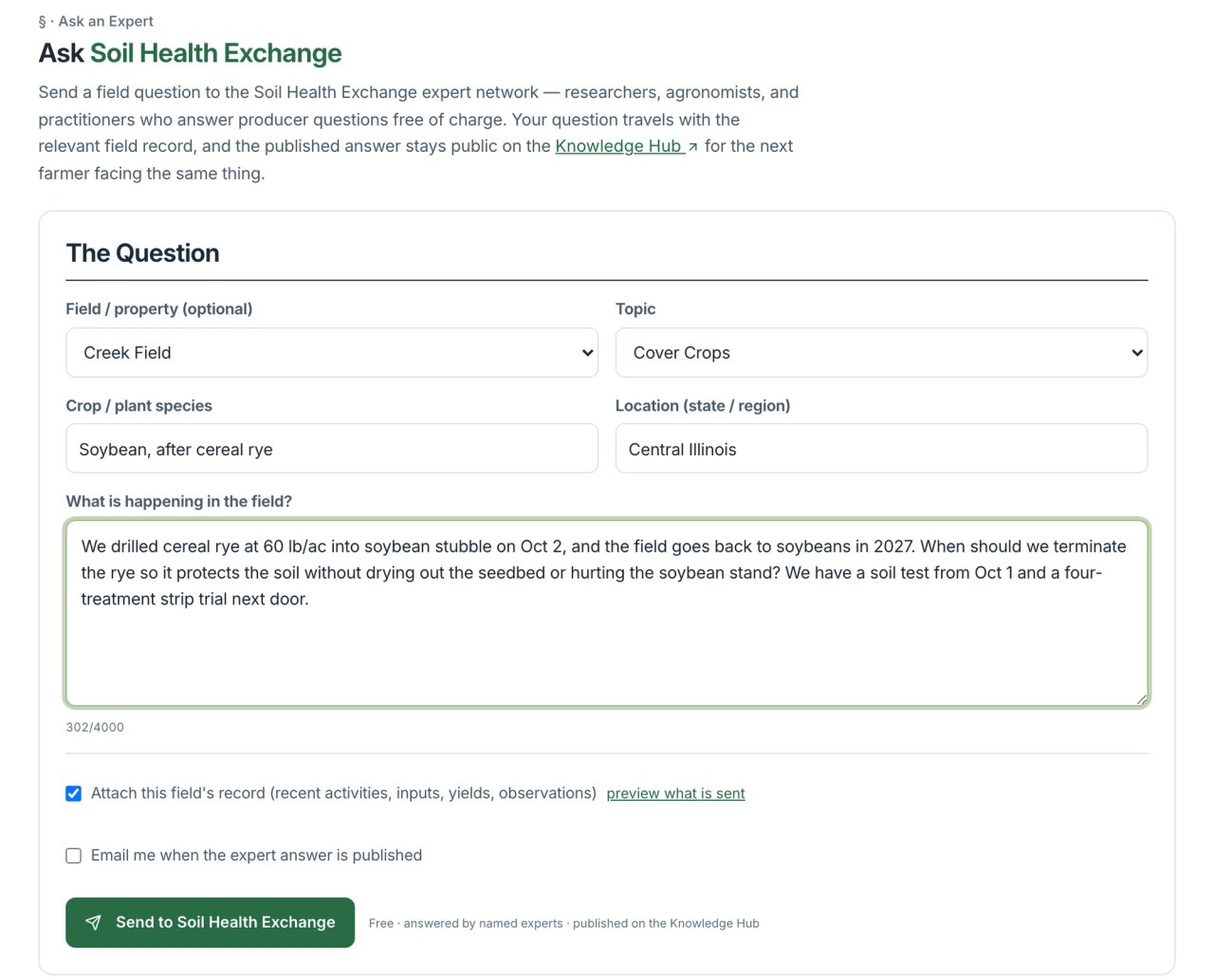
When a decision needs a second opinion, Ask an expert sends the question to the Soil Health Exchange network of researchers, agronomists, and practitioners, who answer free of charge. The field's recent activities, inputs, yields, and observations can travel with it, and you can preview exactly what is sent. The answer is published on the Knowledge Hub, and FieldLog lets you know when it arrives.
The question from Creek Field asks when to terminate the rye ahead of 2027 soybeans. Our cover crop termination guide works through the same decision.
Where FieldLog is headed
FieldLog is built on one principle: ask the farmer only for the facts that create trust. Acres come from the boundary, weather from the date and location, and cost from the product, rate, and area. The app asks for what only the person in the field knows: which field or part of it, what went on, and how much.
The next stages build on that principle:
- Records for part of a field. A pass on the west half or a spot spray along a waterway will be recorded as a mapped area instead of the whole field.
- Drafts from a sentence, a voice note, or a photo. FieldLog will propose the record and ask only for the field and area. Anything it parsed stays a draft until someone accepts it.
- Reports for everyone who shares the work. Season reports for farmers; client rosters, follow-ups, and signed recommendations for agronomists; protocols, bulk plot observations, and clean exports for researchers.
- Connections the farmer switches on. We are connecting FieldLog with the other platforms we are building. FarmDeck will let an input be followed from purchase to use. A question to Soil Health Exchange will carry only the dates, photos, and observations the farmer selects, and the guidance will come back as a next step on the field. TerraValue will draw on the record to assess a practice's costs and environmental outcomes. Farmers will be able to contribute field evidence to OpenAgData research.
The same record already reaches beyond row crops. FieldLog's Landscapes section keeps properties, management zones, tagged trees and shrubs, treatments, and follow-up visits that compare the same plant over time.
Start with one field
Choose one field and this fall's work: the harvest date, the soil sample, and the cover crop seeding and its rate. When the lab results arrive, and again when spring decisions come around, that record will answer the questions memory cannot.
FieldLog plans
| Plan | Price | Includes |
|---|---|---|
| Free | $0 | 2 projects, 3 collaborators, 2 expert questions a month; voice and offline logging, spreadsheet import, field maps, photo logs, and read-only share links |
| Pro | $39 a month or $390 a year | 10 projects, 10 collaborators, 10 expert questions a month; WhatsApp automation, certifier packet and weekly report exports, and priority support |
| Team | Custom | 25 projects, 25 collaborators, and unlimited expert questions; partner data connections as they launch |
Start free at fieldlog.info. No card is required. If your season needs something FieldLog does not do yet, tell us through Send feedback in the app. Requests from farmers, agronomists, and researchers set what we build next.